

Reminders
Apple Inc.
Download price only. In-app purchases and subscriptions may cost extra.
- Developer
- Apple Inc.
- Version
- 2.6
- Minimum iOS
- 10.0
- Age rating
- 4+
- App Store rating
- 4.83 / 5 (1,011,715)
- App languages
- AR, CA, HR, CS, DA, NL, EN, FI, FR, DE, EL, HE, HI, HU, ID, IT, JA, KO, MS, NB, PL, PT, RO, RU, ZH, SK, ES, SV, TH, ZH, TR, UK, VI
App Store region: United States · Checked: Sep 21, 2026
Sources & method ↗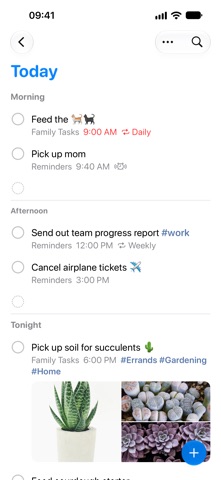
About this app
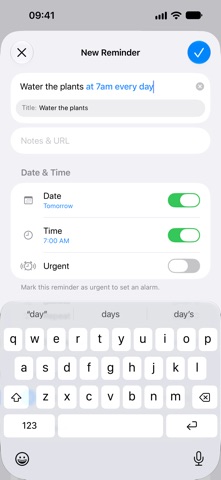
Reminders makes it easier than ever to remember the things you need to do. You can use it for all of life's to-dos, including grocery lists, projects at work, or anything else you want to track. And with iCloud, it's easy to keep all your devices in sync, so you’ll always have your reminders with you. Features Fast and easy to use • Use Siri to create reminders with your voice, or add Reminders to your Control Center or iPhone Action Button to quickly create a reminder on the go. • Create, edit, and complete scheduled reminders from within the Calendar app. • Add a widget to your Home Screen on iOS and iPadOS, or Notification Center on macOS, to view and complete reminders. • Make shopping easier with grocery lists that automatically group related items into sections like dairy and produce. Powerful organization • Smart Lists - Today, Scheduled, Flagged, All, and Assigned to Me, and Completed - automatically organize and display upcoming reminders. • Organize your reminders with tags to make them easy to find. • Custom Smart Lists automatically include reminders that matter most to you by gathering to-dos based on tags, dates, times, locations, flags, and priority. • Use subtasks to add additional detailed tasks to a reminder. • Organize reminders within a list by creating section headers; tap Auto-Categorize at the top of a list to have Apple Intelligence organize your reminders into sections by related categories. You can also try viewing sections in column view to arrange them across your screen. It’s a powerful way to visualize tasks, or even make simple kanban boards. • Save a list as a template to reuse it for routines, packing lists, and more. Share templates with others via a link, or download templates that others have shared. Be reminded when and how you want • Set reminders to repeatedly remind you daily, weekly or at custom intervals. • Trigger reminders by specific locations, for example when you arrive at home or work, or when you get in your car. • Tag people in a reminder to get a reminder the next time you chat with them in Messages. Collaborate with others • Share and collaborate on a list of reminders - everyone with access to the shared list will be able to add or complete reminders. • Assign reminders to people with whom you share lists. Intelligence • Share a webpage, note, or any text to the Reminders app and Apple Intelligence will suggest relevant tasks and grocery items from what you’re looking at. • Natural language support allows you to type phrases to create reminder settings. Try something like “Jog every other morning” for a specific, recurring reminder. Reminders for Apple Watch • Get notified and mark reminders as complete right from your wrist and automatically sync across your iPhone, iPad, Mac, or Apple Vision Pro with iCloud. • View reminders and create new ones directly on your Apple Watch. Certain features are available only in select languages and regions.
What’s new
Bug Fixes and Feature Enhancements