

Timery: Time Tracker
Joseph Hribar
Download price only. In-app purchases and subscriptions may cost extra.
- Developer
- Joseph Hribar
- Version
- 1.8.2
- Minimum iOS
- 15.0
- Age rating
- 4+
- App Store rating
- 4.85 / 5 (1,130)
- App languages
- EN
App Store region: United States · Checked: Sep 21, 2026
Sources & method ↗
About this app
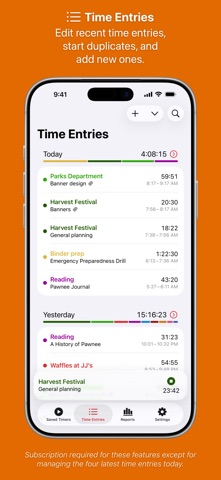
Enhance your Toggl time-tracking experience with Timery! Start your most-used timers with one tap. Edit your time entries easily. See reports of your time tracked. With its apps, widgets, and Shortcuts actions, Timery brings you easy time tracking with Toggl. Timery works on iPhone, iPad, Mac, and Apple Watch with your free or paid Toggl Track account. It is made independently of Toggl. Timery’s features: Saved Timers Save your frequently used timers and quickly start them. Time Entries Edit recent time entries, start duplicates, and add new ones. Time Entry Suggestions Select from suggested saved timers & recent timers when starting or editing time entries. Split Time Entries Split one entry into two or three at specified times or durations. Reports See your time tracked today, this week, and beyond with filtering & grouping options. Export it too. Manage Projects & More Edit your Toggl projects & tags and add new ones. Interactive Widgets Start & stop time entries, check time tracked, show report details, and more. Live Activities Show your current time entry on the Lock Screen and in the Dynamic Island. Shortcuts Support Start & stop time entries, check your current time entry, update time entries, check time tracked, and more. Keyboard Shortcuts Start & stop time entries, edit the current time entry, navigate the app, and more. And more is planned. A few more notes: • Timery is a Toggl client and requires a Toggl Track account • Timery requires an internet connection to perform tasks • Saved timers & saved reports sync with iCloud to all your devices signed in with the same Apple ID Timery is free to use on a limited basis: save up to four timers, manage the four latest time entries today (the rest are read-only), and edit the current time entry. With a monthly or yearly subscription (which includes a two-week free trial), join the Timery Club and unlock all the app’s functionality. You’ll also be helping support the app & future development, and I greatly appreciate that! Happy time tracking! ——— Timery has been featured on MacStories, Cortex, Connected, AppStories, Upgrade, and The Sweet Setup. Federico Viticci, MacStories: “What sets Timery apart from other time tracking utilities is the unique combination of developer Hribar’s understanding of the needs of Toggl users and his embrace of modern iOS and iPadOS technologies. Timery isn’t just a more customizable Toggl client with advanced features […]; it’s also an exemplary iOS and iPadOS citizen that showcases what great iOS and iPad apps should offer.” Myke Hurley, Upgrade: “Timery is my favorite iOS app ever. I get such great use out of it, so it’s personal to me. Time tracking is a big part of my life. But this application—the amount of work that is put into this and new features is truly astounding. […] It’s really just a masterclass in long-term app development.” Mike Schmitz, The Sweet Setup: “Timery is hands down the best time tracking app for iOS. It gives you a functional user interface that is perfect for managing your timers and your time entries, the Shortcuts support is stellar, and the widgets eliminate much of the friction that typically comes from starting and stopping manual timers.” ——— Subscription Details: • Payment will be charged to your Apple ID account at the confirmation of purchase or after the free trial period if offered. • Your subscription will automatically renew unless it is canceled at least 24 hours before the end of the current period. Your account will be charged for renewal within 24 hours prior to the end of the current period. • You can manage and cancel your subscriptions by going to your account settings on the App Store after purchase. • Any unused portion of a free trial period will be forfeited when you purchase a subscription. • Privacy policy: https://timeryapp.com/privacy.html • Terms of Use: https://timeryapp.com/terms.html
What’s new
This update has some more small improvements & fixes. Thank you for using Timery and being part of the Timery Club. I couldn’t keep working on Timery without you and your support. Thank you. More to come! Happy time tracking! – Joe ————— Previously in Timery 1.8.1: • Landscape orientation on iPhone • Improved projects syncing between devices • Updated, better-focused context menus • Some visual tweaks and fixes for iOS and macOS 27 • Many more small improvements & fixes. More details: — Landscape iPhone — Timery now supports landscape orientation on iPhone and will show a sidebar in landscape instead of a tab bar (iOS 18 & higher). — Projects Syncing — In an effort to better keep devices in sync, adding or editing projects, tags, & clients in Timery on one device will notify other devices of a change through iCloud. When Timery is opened on those other devices, the app will reload projects, tags, & clients depending on how many hourly Toggl profile API requests remain and how long until the quota resets. — Menus — Context menus throughout the app have many updates & improvements. Actions in Time Entries view menus and the current time entry view menu have been rearranged and reorganized (and sometimes removed) to better focus the menus on core actions. Actions in the Mac menu bar item’s menu have also been rearranged and reorganized to better focus the menu. Some menus and actions as well as the time-tracked items have been consolidated to allow more timers to appear in the menu (when set to not be shown in a submenu) before having to scroll.