
Keep exploringBest iPhone Apps for University Study in 2026Best Scanner and PDF Apps for iPhone Compared in 2026

QuickScan:PDF OCR Text Scanner
iSolid SPRL
Download price only. In-app purchases and subscriptions may cost extra.
- Developer
- iSolid SPRL
- Version
- 9.7.1
- Minimum iOS
- 16.4
- Age rating
- 4+
- App Store rating
- 4.91 / 5 (4,000)
- App languages
- NL, EN, FR, DE, IT, JA, PT, ZH, ES, SV
App Store region: United States · Checked: Sep 21, 2026
Sources & method ↗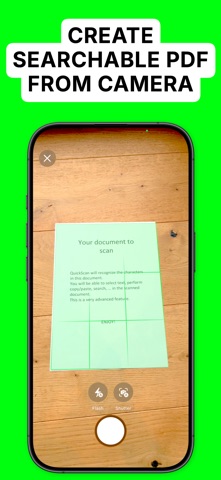
About this app
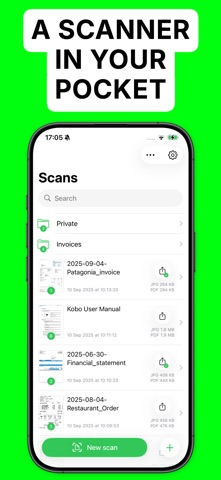
The app is 100% FREE, with NO ads and NO data collection. Donations are possible to support the project. QuickScan is the easiest & quickest yet super-powerful scanner on iOS. Main features: ### iOS integration ### • QuickScan has been designed specifically for iOS & iPadOS for seamless integration and an exceptional user experience. ### Scan & import ### • Scan with your camera (automatic document detection & automatic angle correction) • Import existing images • Import existing PDF files • Organize your documents in folders ### OCR (text recognition) ### • Professional-quality OCR on images and existing PDFs • Make documents searchable with text integrated into PDFs (search, select, copy, paste) • Automatic language detection and dictionary matching for highly accurate results ### SIGN ### • Add signatures to your documents • Create signatures with your finger, Apple Pencil, or import existing signatures • Adjust size and color for a polished look ### Automate ### • Automatic document/file naming with patterns (e.g., document date, title, issuer, time, text, counter) • 'Export Favorites': Automatically export to preconfigured locations (cloud, email, etc.) with custom settings (color, black & white, filename, format) • 'Export Groups': Export to multiple locations simultaneously by grouping Export Favorites • Automatic deletion of documents after successful export • iOS Home screen & Lock screen Widgets & Control Center controls. Associate an Export Favorite to the widget for instant export to that favorite after the scan started by tapping the widget. • Place document automatically in the configured folder when the scan is started from a Widget/Shortcut associated to an Export Favorite • Siri Shortcuts compatible • Launch scan directly from the home screen with a long press on the app icon (or using a widget) ### Export ### • Export in PDF with the recognized text integrated (very advanced feature). This allows to search/copy & paste into the generated PDF. • Export recognized text as a .txt file • Export as images with optional filters (grayscale, black & white) • Save to cloud services with Favorites (iCloud Drive, Dropbox, Google Drive, OneDrive, SharePoint, WebDAV, paperless-ngx, pCloud, NAS, SMB, NextCloud, and more) • Export anywhere (to Files, to any Drive, E-mail, message, Airdrop, …), or to the cloud • Apply image filters (grayscale, black & white), crop, rotate images • Easily adjust output file size and quality with real-time size estimation • ... and much more, there are really many useful features Everything is processed on your device: No internet connection required and ZERO data collection. There’s no quicker, easier way to scan, OCR, and manage documents beautifully SUPPORTED LANGUAGES FOR OCR: • ENGLISH • GERMAN • FRENCH • SPANISH • ITALIAN • PORTUGUESE • CHINESE • KOREAN • JAPANESE • UKRAINIAN • RUSSIAN • VIETNAMESE • THAI • ARABIC • ARABIC NAJDI • Danish • Swedish • Dutch • Norwegian • Norwegian Nynorsk • Norwegian Bokmål • Czech • Polish • Romanian • Turkish • Indonesian • Malay • Other languages are supported but do not benefit from the enhanced accuracy provided by language dictionaries I hope you’ll save a lot of time thanks to the efficiency of QuickScan! Your privacy matters: everything happens locally, on your device! This app does not use any server. No personal data is collected. QuickScan is 100% free to use (no ads, does not sell your data). In-app purchases are optional donations to help me support development and bring future updates. They do not restrict the app's functionality. --------- The privacy policy and terms of use can be found here: https://quickscanapp.com/privacy.html
What’s new
MAJOR UPDATE: • Siri AI: ask Siri questions about your documents in QuickScan. • Document summary + Q&A: QuickScan can now summarize your documents. You can also ask questions about them directly. On your device, no server: respects your privacy. • Adaptive UI: QuickScan's interface now adapts to how you resize the app (iPad, iPhone Mirroring, ...). • Document metadata: QuickScan now extracts useful metadata from your documents. You can consult it, and it will enable powerful automations. On your device, no server: respects your privacy. • Smart file naming improved: Automatic file naming is smarter than before, with better results and more options. On your device, no server: respects your privacy. • Improved search: Search is faster and finds documents whose words are spread over several pages. Choose whether a page must contain all the words or any of them. • Did you know?: QuickScan does not collect personal data and respects your privacy