

Widgy Widgets: Home/Lock/Watch
Woodsign jdoo
Download price only. In-app purchases and subscriptions may cost extra.
- Developer
- Woodsign jdoo
- Version
- 27.0.1
- Minimum iOS
- 17.0
- Age rating
- 4+
- App Store rating
- 4.65 / 5 (26,102)
- App languages
- HR, CS, NL, EN, FI, FR, DE, ID, IT, JA, KO, PL, PT, RO, RU, ZH, ES, SV, ZH, TR, VI
App Store region: United States · Checked: Sep 21, 2026
Sources & method ↗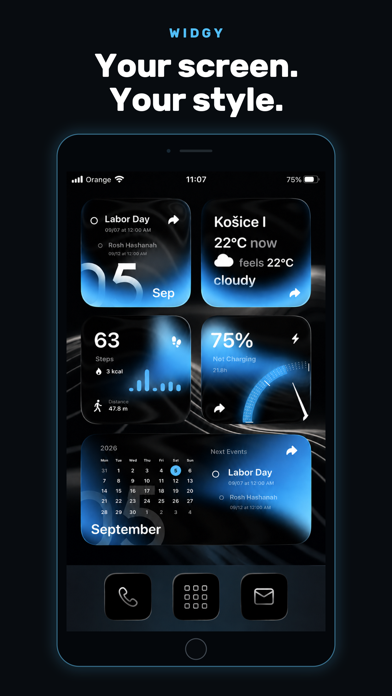
About this app
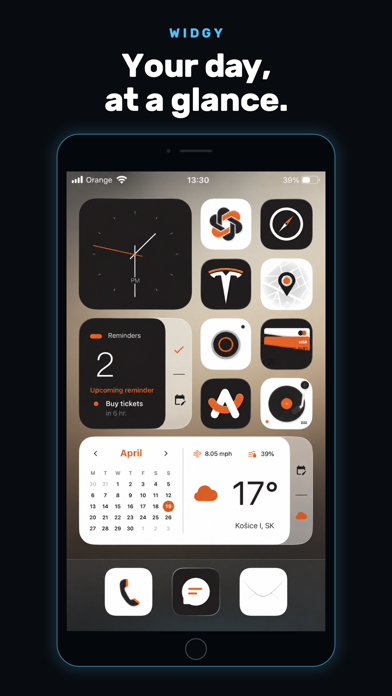
Pick a design you love, then make it yours. Widgy brings custom widgets to your Home Screen, Lock Screen and Apple Watch, built around your style and the information you care about. START WITH A COMMUNITY DESIGN Explore widgets shared by the Widgy community. Import a design, personalize it, or create your own from scratch. MAKE THE DETAILS YOURS Arrange text, photos, symbols, shapes and charts in layers. Adjust colors, fonts, gradients and layout while you see the result in the editor. PUT YOUR DAY AT A GLANCE Create clocks, weather displays, calendars and countdowns. Bring together reminders, activity data and other information in a layout that works for you. Available data depends on the sources and permissions you choose. GO BEYOND THE HOME SCREEN Create Lock Screen widgets and personalize your Apple Watch with Watchy. Explore Live Activities and Dynamic Island layouts on supported devices. Features vary by device and operating system. BUILD SOMETHING MORE Use charts, gauges and custom data sources to create detailed dashboards. Share your widgets with a QR code, a link or a file, and discover more designs from other creators. Try Widgy for free. Optional in-app purchases unlock additional widget slots and features. HEALTH AND PERMISSIONS With your permission, Widgy can display data from Apple Health. Health access and other permissions are optional and depend on the widgets you choose. Widget designs featured in screenshots and app previews: @homescreen_design_marco, @Ahmadansari2233 and pauljima.
What’s new
Improvements: • iCloud Sync: Widget libraries now sync more safely, with verified transfers, preserved conflicts, safer Bin deletions, automatic retries, visible sync status, and immediate library and thumbnail refreshes. • Tap Actions: Improved touch detection for actions inside nested or transformed Groups. Hidden actions no longer override visible ones, data-driven links can resolve when tapped, and Dynamic Island, Control Center, Live Activity, and Picture in Picture actions are more reliable. • Watchy Custom Fonts: Custom fonts used by synced widgets can now be transferred to Apple Watch. Missing or invalid font files are detected before working Watch data is replaced. • Cryptocurrency Picker: The cached catalog loads immediately, refreshes daily, supports custom coins by symbol, distinguishes duplicate symbols, and preserves existing selections. • Weather Data: Open-Meteo and OpenWeather can fill missing supported values from MET Norway without replacing primary-provider data. Fog Coverage is consistently shown as a percentage. • Faster Library: Thumbnail work is deduplicated and prepared in the background, while cloud changes refresh affected widget previews automatically. Bug Fixes: • Fixed Shrink text truncation involving attributed colors or fonts, kerning, custom fonts, monospaced digits, inline images, symbols, and live timers. • Fixed stale or overwritten Health data and Pedometer values falling back to the wrong day. • Fixed Async JavaScript jobs completing twice, returning a late result, or interrupting queued work. • Fixed Smart Color and Smart Symbol boundary edits reordering rules.