

BusyCal: Calendar & Tasks
Busy Apps FZE
Prix du téléchargement uniquement. Les achats intégrés et abonnements peuvent être facturés en plus.
- Développeur
- Busy Apps FZE
- Version
- 6.7.5
- iOS minimum
- 18.0
- Classification d’âge
- 4+
- Note App Store
- 4.69 / 5 (4 492)
- Langues de l’app
- NL, EN, FR, DE, IT, JA, KO, PT, RU, ZH, ES
Région App Store: États-Unis · Vérifié le: 20 sept. 2026
Sources et méthode ↗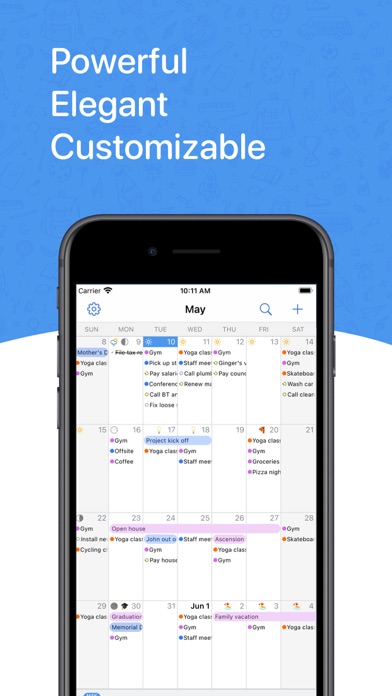
À propos de cette app
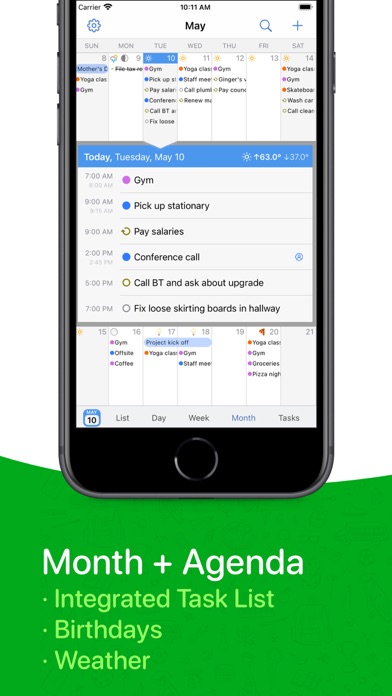
BusyCal is a powerful, flexible and an extremely customizable calendar app for managing busy schedules, events and tasks. BusyCal's unique features include natural language input, customizable calendar views, an integrated to do list, meeting scheduling, travel time, maps integration, tags, alarms, search, weather, moons, birthdays, anniversaries, graphics and more. BusyCal provides reliable support for iCloud, Google Calendar, Google Tasks, Exchange / Microsoft Outlook, Office 365, Todoist and other CalDAV servers, enabling you to sync and share calendars with other Mac and iOS devices running BusyCal or the built-in Calendar app. CALENDAR VIEWS • Display your calendar by Month, Week, Day, List or Year. • Pinch and zoom to control the number of weeks shown per month, and days shown per week. • Customize the calendar appearance including calendar colors, weather, moons, birthdays, anniversaries, event times, week numbers and more. CALENDAR SETS • Manage different, named collections of calendars • Quickly switch between different Calendar Sets • Assign different default calendars to different sets • Create new sets based on existing collections PASSWORD PROTECTION • Enhanced privacy with the option to lock all your calendar sets or just the ones you choose WIDGETS So. Many. Widgets • Upcoming • Event List & Calendar • Calendar & Heatmap • Today's Date • Next two days • This week • Next two weeks EVENTS • Create events manually or automatically using natural language. • Choose from a wide range of attributes to display when viewing or editing events including travel time, time zones, attendees, contacts, tags, maps, last edit time, and more. • Add tags to events to track projects and important events. TASKS • Tasks are displayed directly in the calendar and carry-forward until completed. • Tasks can be undated, or scheduled to occur on a specific date or time. • Tasks can be scheduled to repeat daily, weekly, monthly, etc. • Tasks can be sorted and filtered by date, priority, calendar or title. JOURNALS • Journal entries you create are displayed directly in the calendar as all-day events • Journal can be scheduled to repeat daily, weekly, monthly, etc. TRAVEL TIME, LOCATIONS & MAPS • Create and use Favorite Time Zones • Supports Location Services for adding locations to events. • Supports both Apple Maps and Google Maps for driving directions. • Travel time allows you to block out time to travel to an appointment. • Alarms can warn you in advance of travel time when it's time to leave. PERSONALIZATION • Display Birthdays and Anniversaries, including birthday age and anniversary number. • Display a live 10-day weather forecast. • Display phases of the moon. • Display graphics created in BusyCal for macOS. SYNC & SHARE CALENDARS • Sync and share calendars with iCloud, Google Calendar, Exchange, Outlook, Office 365, Todoist, Fruux, Yahoo, Kerio, Zimbra, Oracle, OwnCloud, Confluence, macOS Server, SabreDAV and other CalDAV servers. • Sync with other Mac and iOS devices running BusyCal or the built-in Calendar app. • Add Zoom, Webex, GoTo Meetings accounts to create meetings directly from the app MORE • Year Overview and Highlights • Receive Inbox notifications of meetings and changes to events on shared calendars. • Search your calendar for past and future events and tasks. • Set default settings for events, tasks and alarms. • Dark Mode
Nouveautés
· [NEW] Siri AI and Shortcuts related improvements and additions · [NEW] Added support for Google Calendar’s expanded palette and custom event colors · [NEW] New option in Settings New Event Defaults to choose whether tapping the + button creates an event or a task, instead of the automatic default · [NEW] Add guests to Google meetings you've been invited to, when the organizer allows it · [NEW] New Year Planner option to align weekdays across months, wall-planner style. Rotate to landscape to see Year View option · [NEW] New and improved settings screen · [NEW] Redesigned first-run setup, making it quicker to add your accounts when you start out · [NEW] New option to reorder accounts from Settings, so calendars from one account can be listed above another · [NEW] Rearrange calendars and accounts directly from a Calendar Set's edit screen, with a Sort Alphabetically option for each account · [NEW] New setting to choose how phone numbers in event notes are called, including FaceTime, WhatsApp, Google Voice and Zoom · [NEW] New Remove Blocking command in the Block on Calendar menu, which now also checkmarks the calendars an event is already blocked on · [NEW] New Include All-Day Tasks setting to show or hide all-day tasks in the calendar · [NEW] Hide tasks assigned to others setting for Todoist accounts · [NEW] Added Russian localization · Improved overall reliability of Google Calendar syncing for meetings, RSVPs, and shared calendars · Improvements to the lock feature; you can now lock and unlock BusyCal with your device passcode when Face ID is not available · Calendar sorting within the Task List now uses the same calendar order visible in Settings Account Calendars. Calendars can be sorted alphabetically from the same settings screen · WebDAV Calendar Titles are now visible in the main Accounts screen · Improved calendar imports to better handle invalid .ics files · Improved location searches for places outside your current area · Optimizations to launch times and memory usage · Improved handling of meeting responses on Office 365 accounts · Smoother scrolling in Month view, including days with event graphics · Export to CSV now has a Select All option · Fixed the calendar landing on the wrong date when opening the app or switching between views · Fixed Google Tasks not moving to their new list in BusyCal when moved in Google · Fixed meeting invitations on Microsoft 365 and Outlook accounts not appearing in the Inbox when the invite was sent to a group or distribution list · Fixed an issue where temperatures could appear on the wrong date · Fixed the forecast not appearing until the app was reopened after allowing access to your location · Ongoing stability and performance enhancements