

Whisper Notes - Speech to Text
SmashMelon LLC
- 开发者
- SmashMelon LLC
- 版本
- 1.8.8
- 最低 iOS 版本
- 18.0
- 年龄分级
- 4+
- App Store 评分
- 4.66 / 5 (618)
- 应用支持语言
- AR, BN, BG, CA, HR, CS, DA, NL, EN, FI, FR, DE, EL, HE, HI, HU, ID, IT, JA, KO, MS, NB, PL, PT, RO, RU, ZH, SK, SL, ES, SV, TA, TH, ZH, TR, UK, VI
App Store 地区: 美国 · 核验于: 2026年9月20日
来源与方法 ↗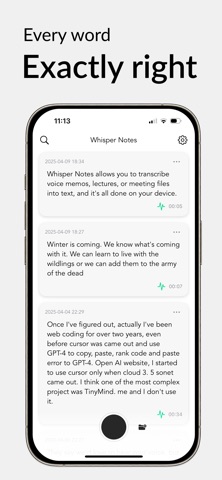

应用介绍
Maybe the best offline transcription app — 70,000+ journalists, researchers, and professionals seem to think so. Turn meetings, lectures, and voice memos into accurate text with speaker labels — fast, 100% offline, on your device. No subscription. One purchase, yours forever. ■ Core Features - Record voice memos and capture ideas instantly—from the Lock Screen, widgets, Action Button, or just say "Hey Siri" - Import audio and video from any app (WhatsApp, Photos, Voice Memos, etc.)—even extract subtitles - Turn meetings, lectures, and interviews into transcripts with speaker labels—see who said what, rename speakers, no length limits - 101 languages, auto-detected (optimized for English)—three models (Parakeet, Whisper, SenseVoice), switch freely - Export as SRT, VTT, or TXT—timestamps and speaker labels included ■ Privacy & Speed Because everything runs on your device, there is nothing to upload—and nothing to leak. Turn on airplane mode before you record and leave it on: Whisper Notes works exactly the same. That matters when the recording is an interview, a client meeting, or something you would never put on someone else's server. Transcribing 5 minutes of audio on iPhone 15: ~18 seconds with Parakeet, ~1 minute with Whisper. SenseVoice is much faster than Whisper and strongest for Chinese, Japanese, and Korean. Each model has its strengths—choose freely based on language and use case. Older devices are slower but work fine. ■ Honest Pricing Because transcription runs on your device, we have no server costs—so there is nothing to charge you monthly for. Most similar apps charge $100+/year; we charge once. No subscriptions, no in-app purchases, no ads. Not satisfied? Tap Settings → Request Refund. ■ Common Questions Does it work completely offline? Yes. Your audio never leaves your device. Works on flights, in remote areas, anywhere. Can I transcribe WhatsApp voice messages or videos? Yes. Share or save audio/video from WhatsApp to Whisper Notes and transcribe offline. Perfect for extracting subtitles without uploading to cloud services. Is there a recording time limit? No limit. Record for hours if you want. Longer recordings just take more time to transcribe on your device. Does it support real-time transcription while recording? Not during recording, but yes during transcription—after you finish recording, you'll see the transcript appear in real-time as it's being generated. Do you support speaker labels (diarization)? Yes—fully offline. Tap the speaker icon on any transcript to see who said what, right on your device. We keep improving accuracy and speed. Where is my data stored? Only on your device. We have zero access. Note: If you delete the app, your recordings are deleted too (because we don't keep secret backups). Please export important files regularly. Can I summarize a transcript? Yes — copy it into whichever AI tool you prefer. Whisper Notes itself never uploads anything; your audio and text stay on your device. Why does transcription stop when I switch apps? iOS limits background GPU usage for third-party apps. Just return to the app and tap "Re-transcribe"—it will restart. Which devices are recommended? iPhone 12 and newer. Older devices (iPhone 11, iPhone SE 2nd gen) are not recommended—the app will not function properly on these devices. What languages are supported? English, Español, Français, Deutsch, Português, Italiano, Nederlands, 简体中文, 繁體中文, 日本語, 한국어, Hindi, Arabic, Русский, Türkçe, Polski, Українська, Tiếng Việt, Thai, Tagalog, Bahasa Indonesia, Svenska, Norsk, Dansk, Suomi, Čeština, Greek, Hebrew, Română, Magyar, Persian, Urdu, and 65+ more languages. ■ Contact Questions? Email support@whispernotes.app Learn more: whispernotes.app
更新内容
New Features - Apple Speech — on iOS 26, choose Apple's speech engine alongside Parakeet, SenseVoice and Whisper. Download only the languages you need; everything stays on your device. - Recordings resume automatically after a phone call or other interruption (up to two minutes). - One Share menu for everything — text, timestamps, text + audio, TXT/SRT/VTT — the same on the note and in detail view, plus Bulk Share Text for several notes. Improvements - Faster: models are ready sooner after launch, the note appears the moment you stop recording, and saving edits no longer blocks the interface. - Very long transcripts open instantly — text first, timestamps generated in the background. - Model downloads resume where they left off, retry automatically, and say why if they fail. - Speaker detection is in every note's menu and now handles long recordings reliably. - VoiceOver: every control is labeled, results are announced, notes read as one sentence, and Reduce Motion is respected. Fixes - Force-quit while recording? The recording is in your list when you reopen the app, and transcribes automatically. - Failed transcriptions and imports show the actual reason, and an interrupted transcription keeps the text it already produced. - Whisper: quiet or distant speech is no longer dropped, and phantom phrases in silent passages are filtered out. - Silent recordings with a Bluetooth or wired headset? Turn on "Prefer Built-in Microphone" in Recording & Audio. - Stability improvements throughout, especially SenseVoice, sharing and the custom dictionary. Edits and deletions can no longer be lost or come back.